

S
I
J
I
I
B
U
K
U
N
Lua enables any business to launch AI powered sales, support and booking agents in minutes. The core project goal is to redesign the existing "Create / Manage Agent" flow into an experience that feels like onboarding a friendly teammate, not configuring complex software. The redesign focused on creating a two-pane Agent Builder for a desktop web app, emphasizing clarity, immediate feedback, and use of plain language for non-technical users.
Lua enables any business to launch AI powered sales, support and booking agents in minutes. The core project goal is to redesign the existing "Create / Manage Agent" flow into an experience that feels like onboarding a friendly teammate, not configuring complex software. The redesign focused on creating a two-pane Agent Builder for a desktop web app, emphasizing clarity, immediate feedback, and use of plain language for non-technical users.


Category
Category
AI
AI
Sass
Sass
Role
Role
Product Designer
Product Designer
Company
Company
Lua AI
Lua AI
Duration
Duration
7 days
The primary design problem is making the process of creating powerful AI agents accessible and intuitive for non-technical users building an agent for the first time, necessitating the removal of all technical complexity and jargon.
The primary design problem is making the process of creating powerful AI agents accessible and intuitive for non-technical users building an agent for the first time, necessitating the removal of all technical complexity and jargon.

The solution is a two-pane Agent Builder (Build on the left, Live Test on the right) designed to be calm, fun, and obvious. It utilizes plain language only (avoiding terms like “RAG” or “LLM”), incorporates friendly defaults and presets for quick success, and ensures an always-on preview where material changes trigger an automatic chat reset for immediate testing.
The solution is a two-pane Agent Builder (Build on the left, Live Test on the right) designed to be calm, fun, and obvious. It utilizes plain language only (avoiding terms like “RAG” or “LLM”), incorporates friendly defaults and presets for quick success, and ensures an always-on preview where material changes trigger an automatic chat reset for immediate testing.

The main challenge was ensuring the experience was successful for a non-technical audience, requiring the design to strictly avoid technical jargon and instead adopt a tone and structure that makes configuring the agent feel like providing a simple job brief to a teammate
The design has a fixed structure i.e The left pane is for the Agent configuration /Resources, and the right pane is for the "Live Test" chat panel. This fixed structure dictates how content is organized and how users interact with the building and testing process simultaneously.
The main challenge was ensuring the experience was successful for a non-technical audience, requiring the design to strictly avoid technical jargon and instead adopt a tone and structure that makes configuring the agent feel like providing a simple job brief to a teammate
The design has a fixed structure i.e The left pane is for the Agent configuration /Resources, and the right pane is for the "Live Test" chat panel. This fixed structure dictates how content is organized and how users interact with the building and testing process simultaneously.

Lua's underlying service, which this builder supports, is trusted by 100+ businesses globally. This redesign will help Lua's AI sales, support, and booking agents that currently operate in 7 countries, helping businesses onboard seamlessly by converting conversations to sales 24/7 through integrations into large revenue engines like Shopify and Ordable.
Lua's underlying service, which this builder supports, is trusted by 100+ businesses globally. This redesign will help Lua's AI sales, support, and booking agents that currently operate in 7 countries, helping businesses onboard seamlessly by converting conversations to sales 24/7 through integrations into large revenue engines like Shopify and Ordable.

The research focused on understanding how non-technical business owners and teams create AI agents for sales, support, and bookings. Many users want the benefits of AI automation, but the setup process often feels too technical, with confusing terms, unclear configuration steps, and little confidence that the agent will behave correctly.
The research focused on understanding how non-technical business owners and teams create AI agents for sales, support, and bookings. Many users want the benefits of AI automation, but the setup process often feels too technical, with confusing terms, unclear configuration steps, and little confidence that the agent will behave correctly.

Current create/manage agent interface
I broke down the create/manage agent feature into 6 different sections to make the user journey less overwhelming and intuitive for non-technical users.
I broke down the create/manage agent feature into 6 different sections to make the user journey less overwhelming and intuitive for non-technical users.
Users start by naming their agent and describing it like a real person, including who it helps and what it cares about. An avatar is generated automatically and can be regenerated with a simple prompt.
They can also add a short product or service description, which may be pre-filled from tools like Shopify. The constraints section lets users set clear boundaries so the agent stays helpful, safe, accurate, and focused.
Users start by naming their agent and describing it like a real person, including who it helps and what it cares about. An avatar is generated automatically and can be regenerated with a simple prompt.
They can also add a short product or service description, which may be pre-filled from tools like Shopify. The constraints section lets users set clear boundaries so the agent stays helpful, safe, accurate, and focused.
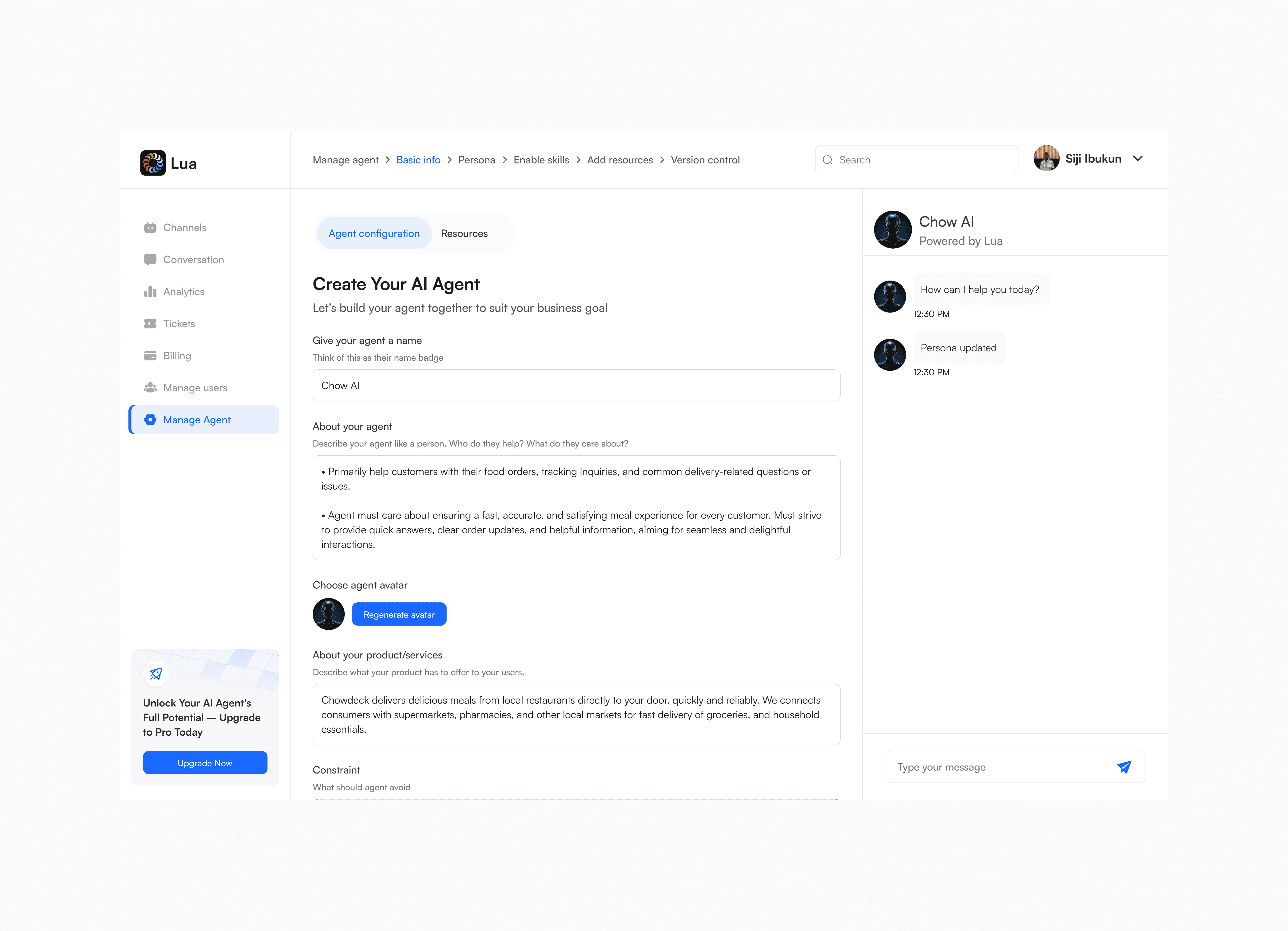
Basic info (Agent name, avatar, about product & constraint) prototype
Redesigning the Persona section is essential because many users are non-technical and creating an AI agent for the first time. Persona presets, tone options, and energy levels help them quickly shape an agent that matches their brand voice without confusion.
The Persona Adjuster then gives users more control by letting them refine responses with simple examples of what felt wrong and how the agent should reply.
Redesigning the Persona section is essential because many users are non-technical and creating an AI agent for the first time. Persona presets, tone options, and energy levels help them quickly shape an agent that matches their brand voice without confusion.
The Persona Adjuster then gives users more control by letting them refine responses with simple examples of what felt wrong and how the agent should reply.
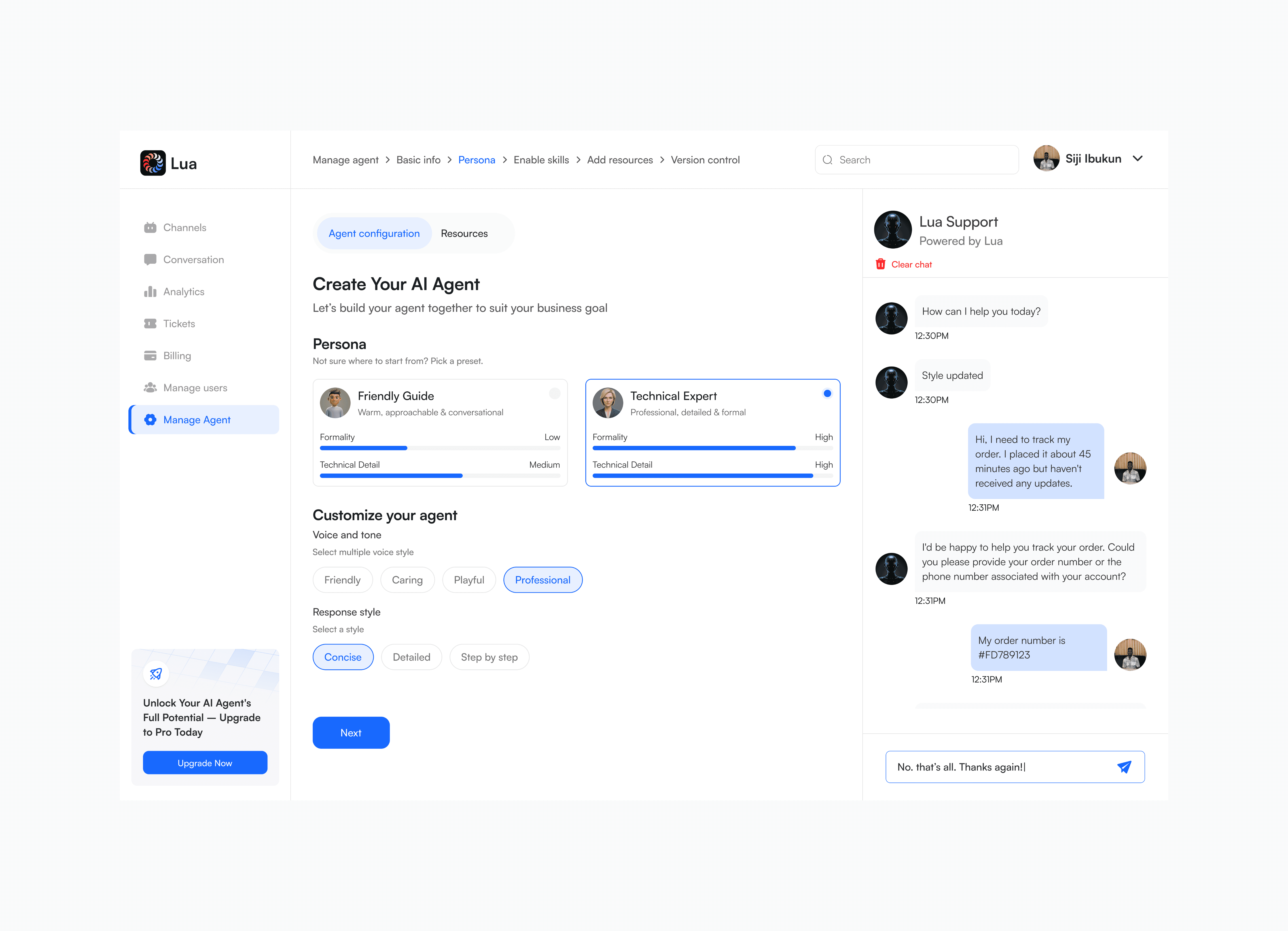
Persona setting prototype
I redesigned the Skills section to help non-technical users easily choose what their agent can do. Clear, pre-built options make the agent useful right away for tasks like sales, bookings, support tickets, live chat handoff, web search, and knowledge search.
The goal was to make these key capabilities simple to find, understand, and enable.
I redesigned the Skills section to help non-technical users easily choose what their agent can do. Clear, pre-built options make the agent useful right away for tasks like sales, bookings, support tickets, live chat handoff, web search, and knowledge search.
The goal was to make these key capabilities simple to find, understand, and enable.
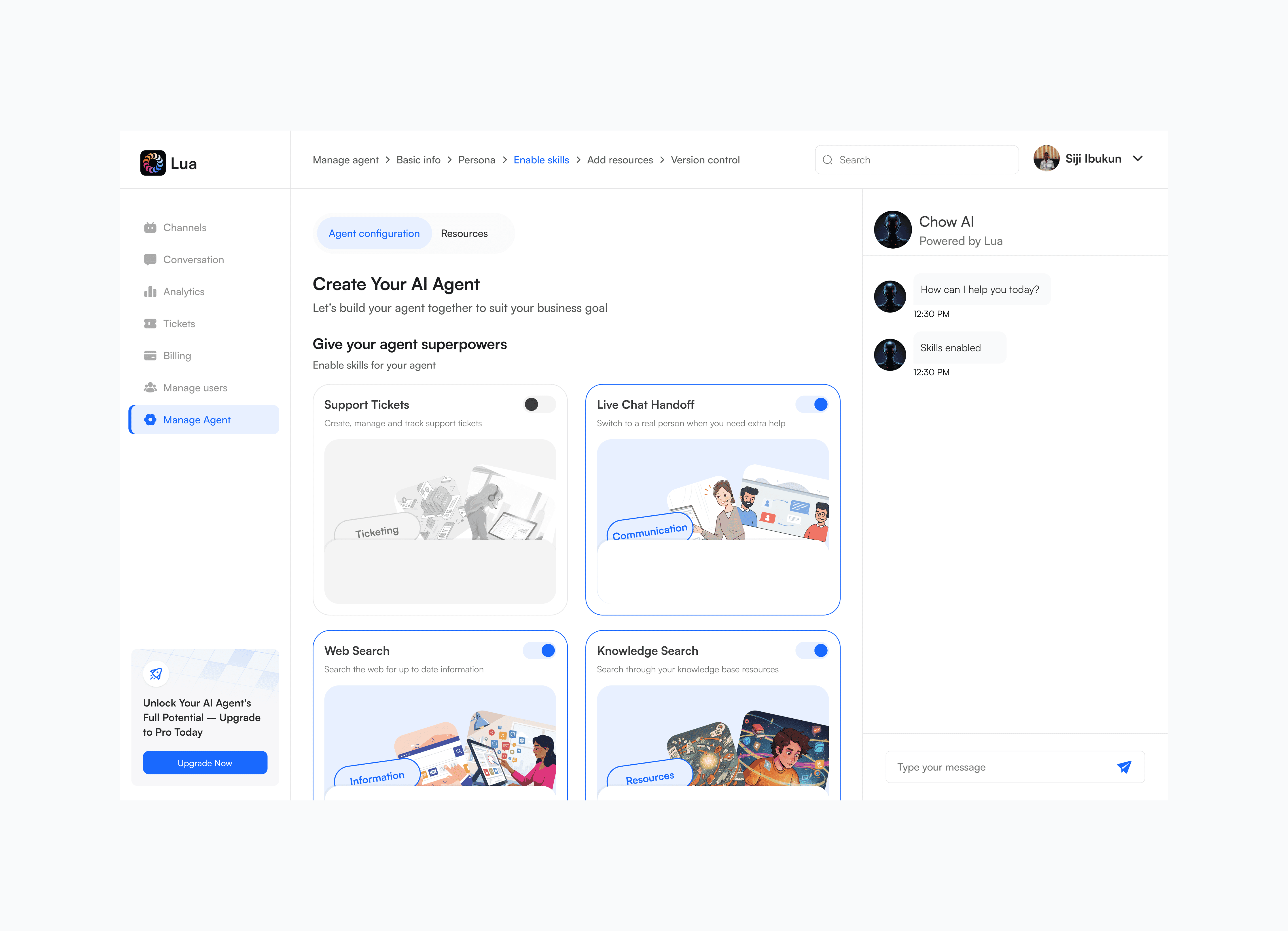
Enable skills prototype
The Resources tab lets users give the agent the information it needs to act like a knowledgeable team member, such as sales materials, documents, processes, or live links.
After adding resources, users can test the agent immediately. Because new resources change how the agent responds, the Live Test chat resets automatically so users can quickly check whether the agent understands the updated information.
The Resources tab lets users give the agent the information it needs to act like a knowledgeable team member, such as sales materials, documents, processes, or live links.
After adding resources, users can test the agent immediately. Because new resources change how the agent responds, the Live Test chat resets automatically so users can quickly check whether the agent understands the updated information.
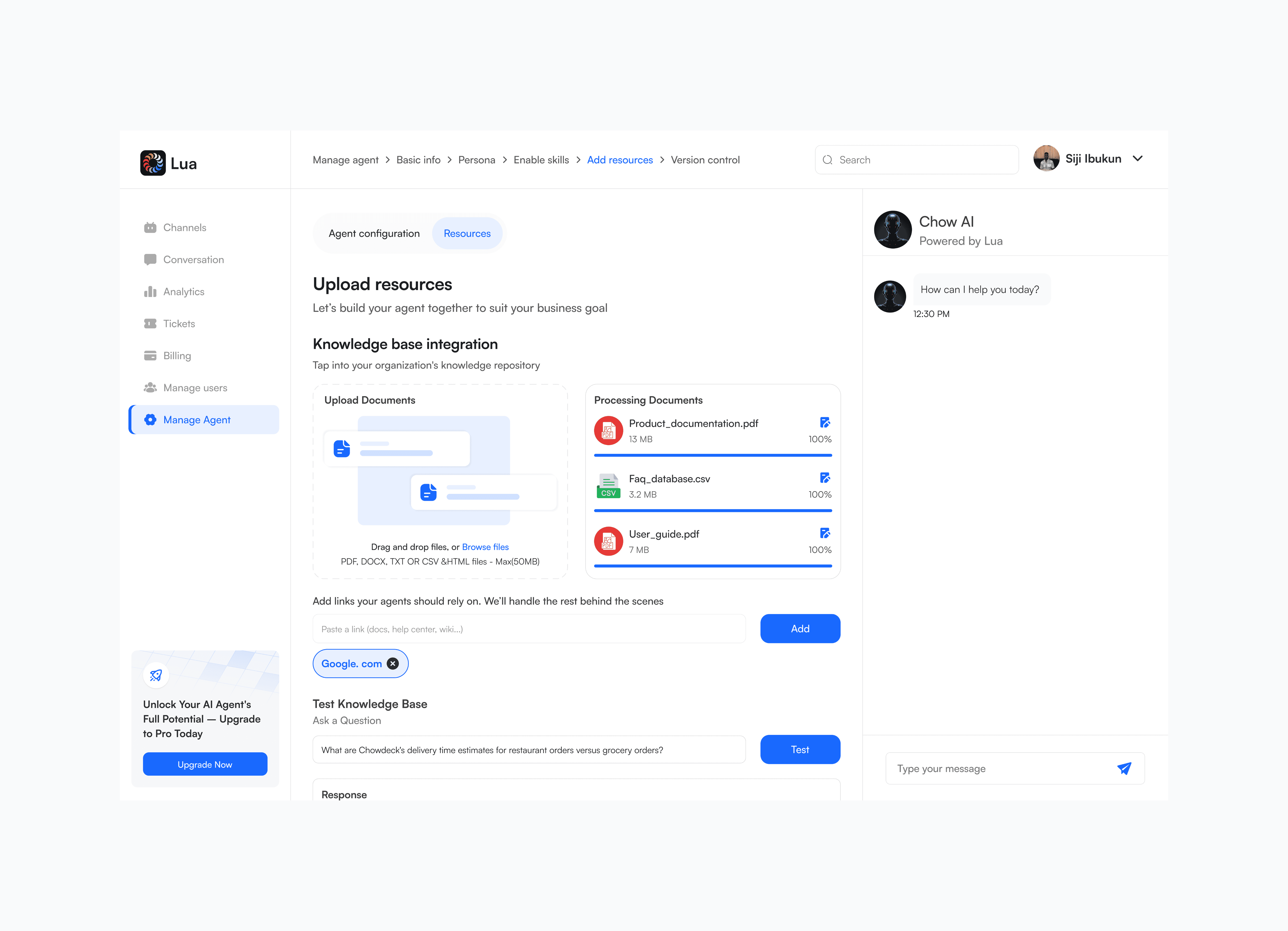
Add resources prototype
The Live Test panel, positioned as the fixed chat panel in the right column of the two-pane layout, serves as an always-on preview where changes feel immediate. This immediate feedback is a high-priority metric. Non-technical users need to see the direct result of their configuration changes instantly to build confidence and understand the agent's behavior.
The Live Test panel, positioned as the fixed chat panel in the right column of the two-pane layout, serves as an always-on preview where changes feel immediate. This immediate feedback is a high-priority metric. Non-technical users need to see the direct result of their configuration changes instantly to build confidence and understand the agent's behavior.
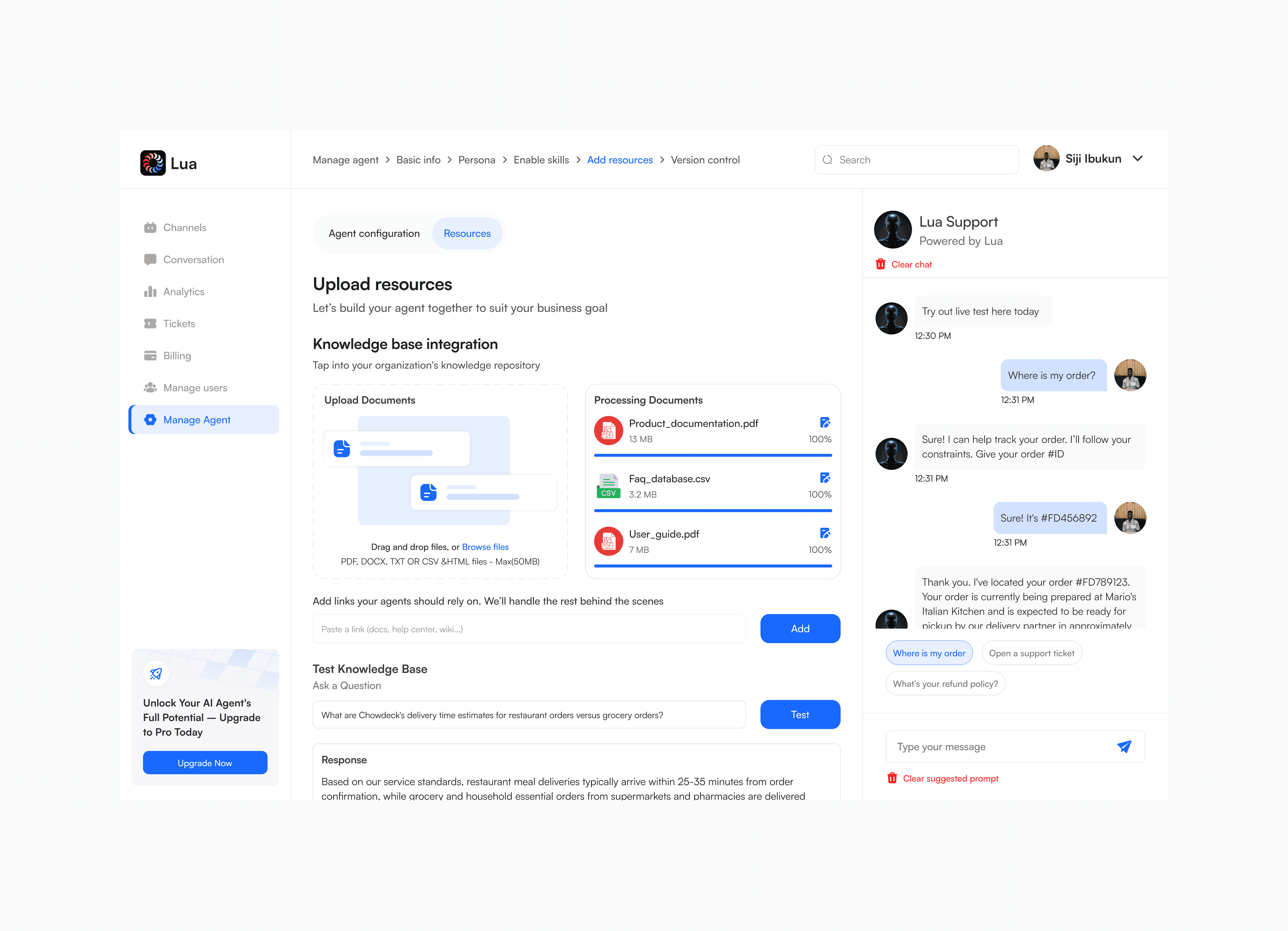
Live test prototype
The Preview feature in version control gives users safety and confidence when managing their agent. Since many users are non-technical, they need to know that changes will not break the live version.
By allowing users to preview drafts or past versions in chat before deploying, they can test freely while keeping the active agent secure.
The Preview feature in version control gives users safety and confidence when managing their agent. Since many users are non-technical, they need to know that changes will not break the live version.
By allowing users to preview drafts or past versions in chat before deploying, they can test freely while keeping the active agent secure.
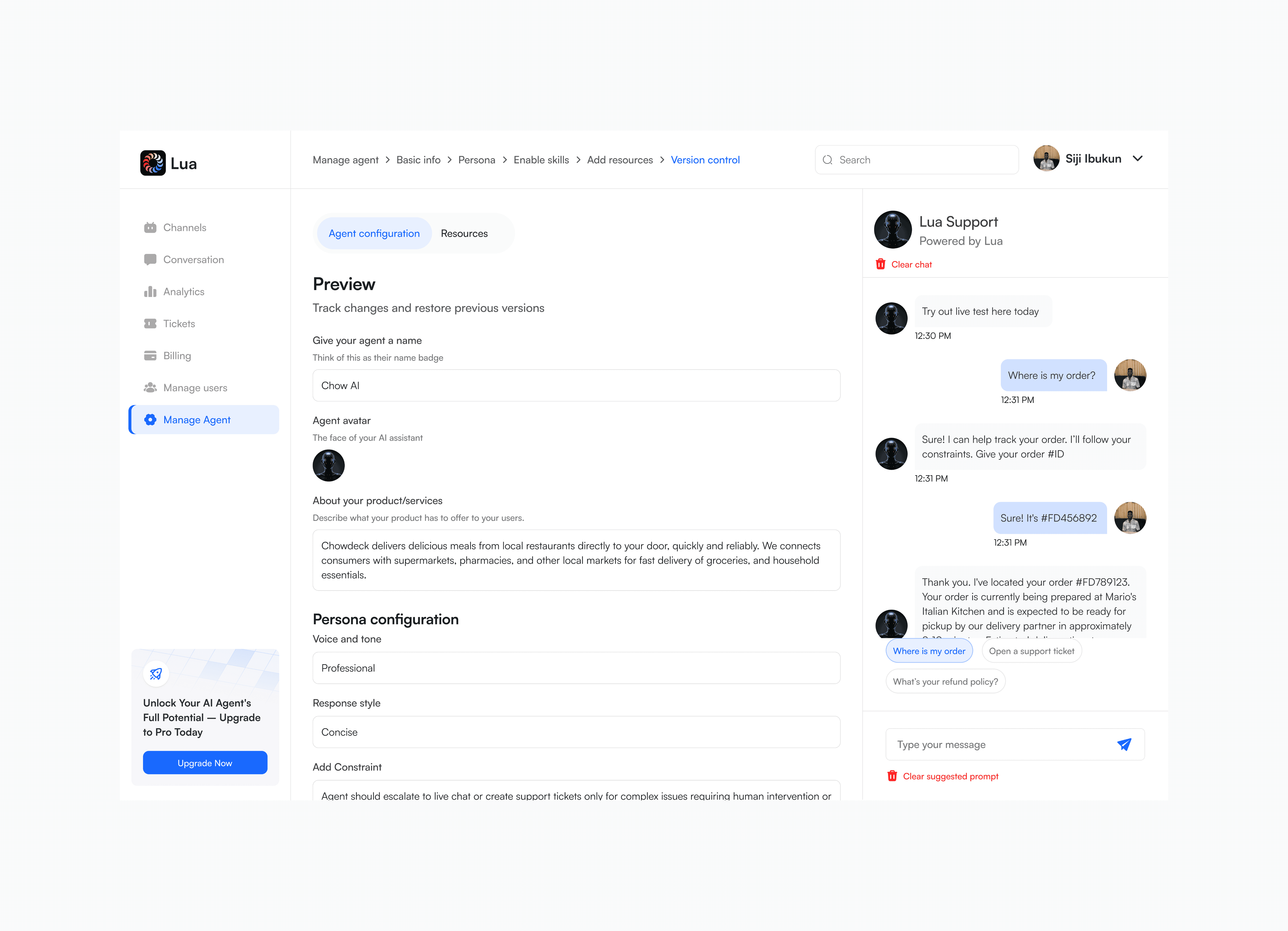
Version control -> preview prototype
Non-technical users need an easy way to see what changed between drafts or live versions. The Compare feature shows the differences between two versions clearly, helping users understand edits and avoid confusion before making decisions.
Non-technical users need an easy way to see what changed between drafts or live versions. The Compare feature shows the differences between two versions clearly, helping users understand edits and avoid confusion before making decisions.
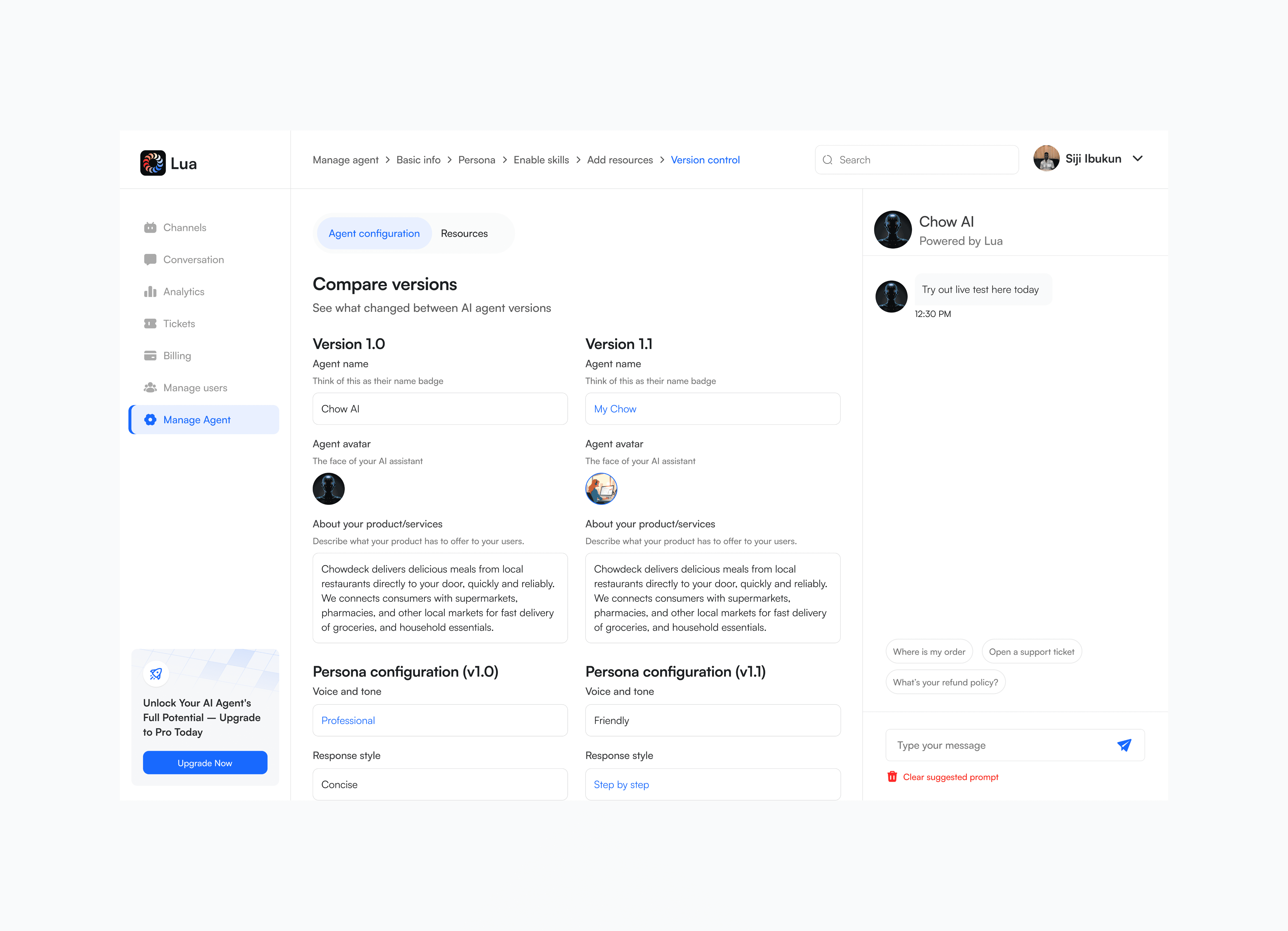
Version control -> compare prototype
The Restore feature gives non-technical users a safety net when editing their agent. It lets them experiment freely, knowing they can always undo changes and return to a stable launched version if needed.
The Restore feature gives non-technical users a safety net when editing their agent. It lets them experiment freely, knowing they can always undo changes and return to a stable launched version if needed.
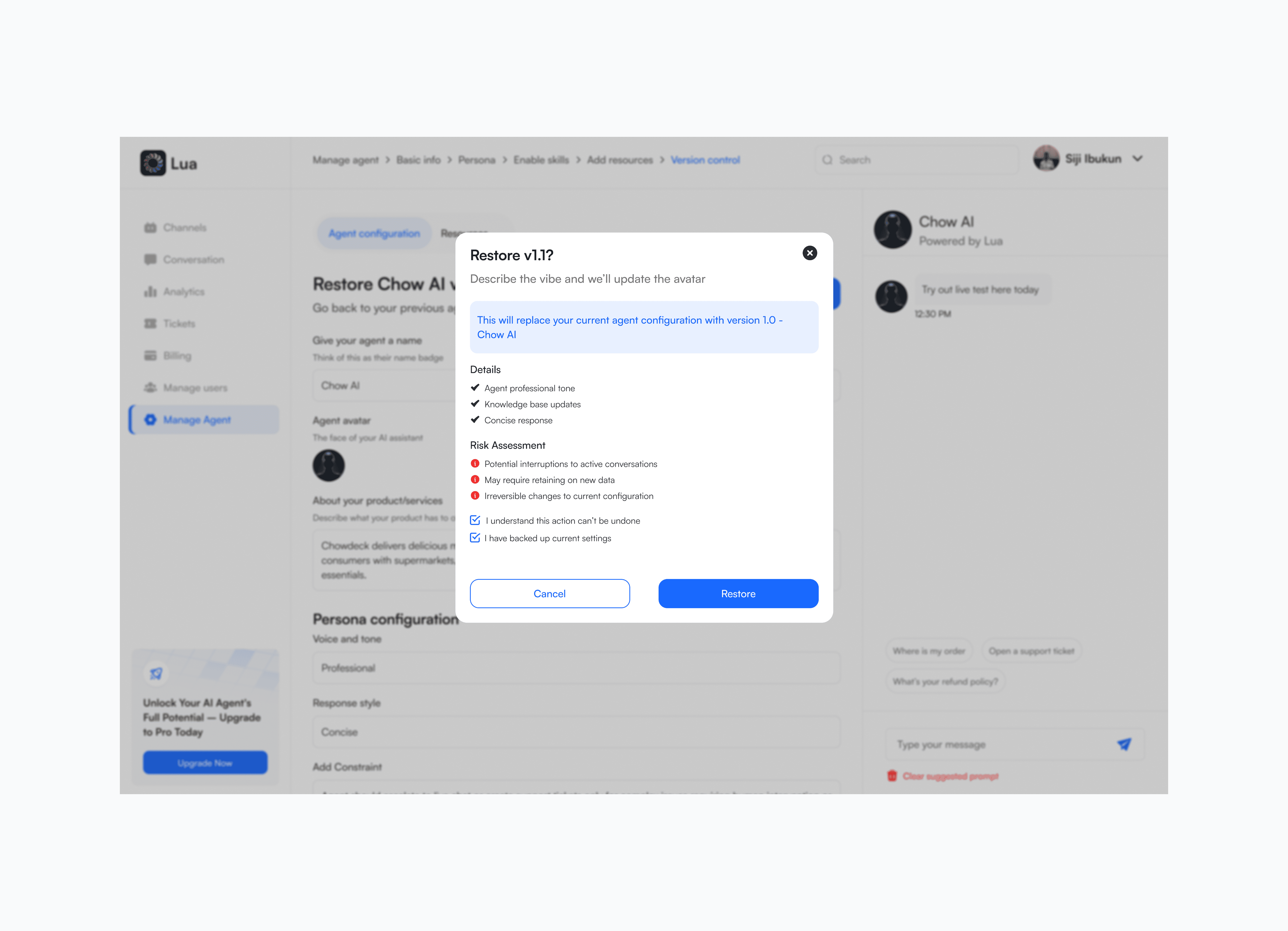
Version control -> restore prototype
Redesigning the Launch section helps non-technical users complete the agent setup safely and with confidence. Launching gives clear feedback that a new version is live, saved in history, and ready to handle conversations around the clock.
Redesigning the Launch section helps non-technical users complete the agent setup safely and with confidence. Launching gives clear feedback that a new version is live, saved in history, and ready to handle conversations around the clock.
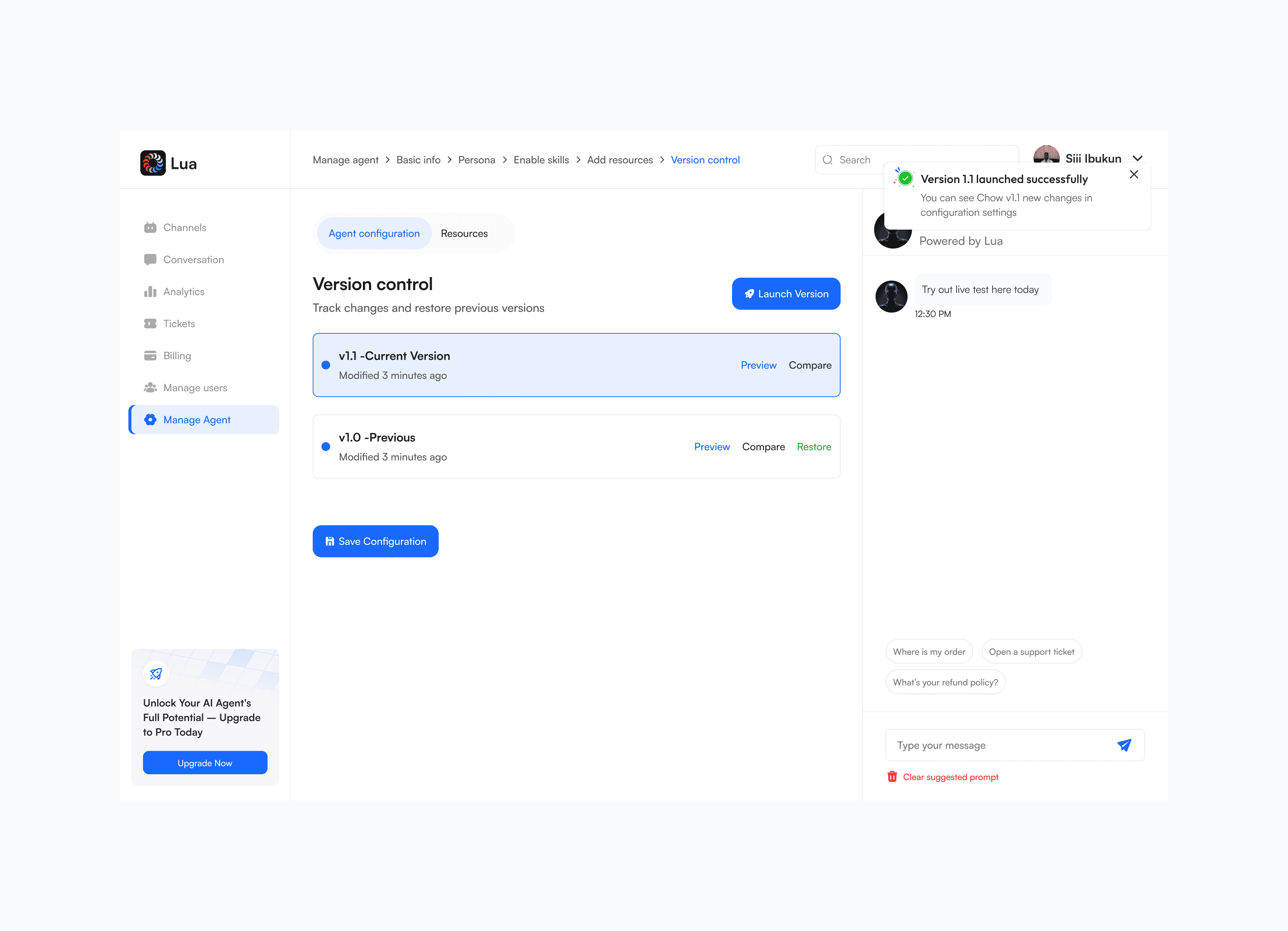
Version control -> launch prototype
Here are the components that made up the design systems used in this project.
Here are the components that made up the design systems used in this project.
Design system
Design system
The redesign reimagined how Lua’s AI agents are created and managed, turning what once felt like configuring complex software into an experience more like onboarding a helpful teammate—especially for non-technical users. This was made possible through a two-pane Agent Builder with a constant live preview and a strict commitment to plain, jargon-free language.
Thoughtful features such as smart defaults and presets for quick setup, an auto-reset chat that instantly reflects major updates, and an easy-to-use version history with Preview, Compare, and Restore options create a smooth and secure workflow. The result is a highly intuitive builder that empowers any business to quickly launch AI sales, support, and booking agents that communicate seamlessly in their brand voice.
The redesign reimagined how Lua’s AI agents are created and managed, turning what once felt like configuring complex software into an experience more like onboarding a helpful teammate—especially for non-technical users. This was made possible through a two-pane Agent Builder with a constant live preview and a strict commitment to plain, jargon-free language.
Thoughtful features such as smart defaults and presets for quick setup, an auto-reset chat that instantly reflects major updates, and an easy-to-use version history with Preview, Compare, and Restore options create a smooth and secure workflow. The result is a highly intuitive builder that empowers any business to quickly launch AI sales, support, and booking agents that communicate seamlessly in their brand voice.