

S
I
J
I
I
B
U
K
U
N
Introducing a ‘Schedule Transfer” feature for Opay(a one-stop mobile-based platform for payments, transfers, loans, savings and other essential services for every individual) to allow users to automate money transfers at any desired time.
Introducing a ‘Schedule Transfer” feature for Opay(a one-stop mobile-based platform for payments, transfers, loans, savings and other essential services for every individual) to allow users to automate money transfers at any desired time.


Category
Category
Fintech
Fintech
Role
Role
Product Designer
Product Designer
Company
Company
Opay
Opay
Duration
Duration
10 days
In today’s fast-paced world, users often need to send money but also want the process to be convenient and stress-free. However, the absence of a scheduled transfer feature in the OPay mobile app creates a major challenge for users.
For example, employers with domestic workers may forget to send payments on time because of their busy schedules. Without a scheduled transfer option, they can easily miss the right payment date, even after the worker has completed their agreed period of service.
In today’s fast-paced world, users often need to send money but also want the process to be convenient and stress-free. However, the absence of a scheduled transfer feature in the OPay mobile app creates a major challenge for users.
For example, employers with domestic workers may forget to send payments on time because of their busy schedules. Without a scheduled transfer option, they can easily miss the right payment date, even after the worker has completed their agreed period of service.

Introducing a scheduled transfer feature in OPay will allow users to automate their money transfers with ease. By enabling users to set transfers for future dates, create recurring payments, and receive timely reminders, the feature gives them greater control over their financial activities. The goal is to make money management simpler, more efficient, and better suited to the different needs of OPay users.
Introducing a scheduled transfer feature in OPay will allow users to automate their money transfers with ease. By enabling users to set transfers for future dates, create recurring payments, and receive timely reminders, the feature gives them greater control over their financial activities. The goal is to make money management simpler, more efficient, and better suited to the different needs of OPay users.

Finding the balance between keeping it simple (for basic recurring rent payments) and flexible enough (for complex schedules). Too many options = overwhelming; too few = limiting.
Designing intuitive interfaces for selecting frequencies (weekly, monthly, custom) and visualizing upcoming transfers without overwhelming users.
Building trust among users to feel certain save with their money. Eliminating worries about "what if something goes wrong?" You need to design clear confirmations and make it easy to review scheduled transfers.
Notifying users without annoying them. Before transfer, After, Failed attempts and Multiple scheduled transfers can lead to notification fatigue.
Modifying and stoping scheduled transfers. How to edit recurring series, What if a transfer is already processing.
Finding the balance between keeping it simple (for basic recurring rent payments) and flexible enough (for complex schedules). Too many options = overwhelming; too few = limiting.
Designing intuitive interfaces for selecting frequencies (weekly, monthly, custom) and visualizing upcoming transfers without overwhelming users.
Building trust among users to feel certain save with their money. Eliminating worries about "what if something goes wrong?" You need to design clear confirmations and make it easy to review scheduled transfers.
Notifying users without annoying them. Before transfer, After, Failed attempts and Multiple scheduled transfers can lead to notification fatigue.
Modifying and stoping scheduled transfers. How to edit recurring series, What if a transfer is already processing.

Creating a schedule transfer feature will make automating money transfer seamless for 10 million users and it will ensure that connectivity issues hindering their ability to initiate transfer at a specific time is eliminated.
Creating a schedule transfer feature will make automating money transfer seamless for 10 million users and it will ensure that connectivity issues hindering their ability to initiate transfer at a specific time is eliminated.
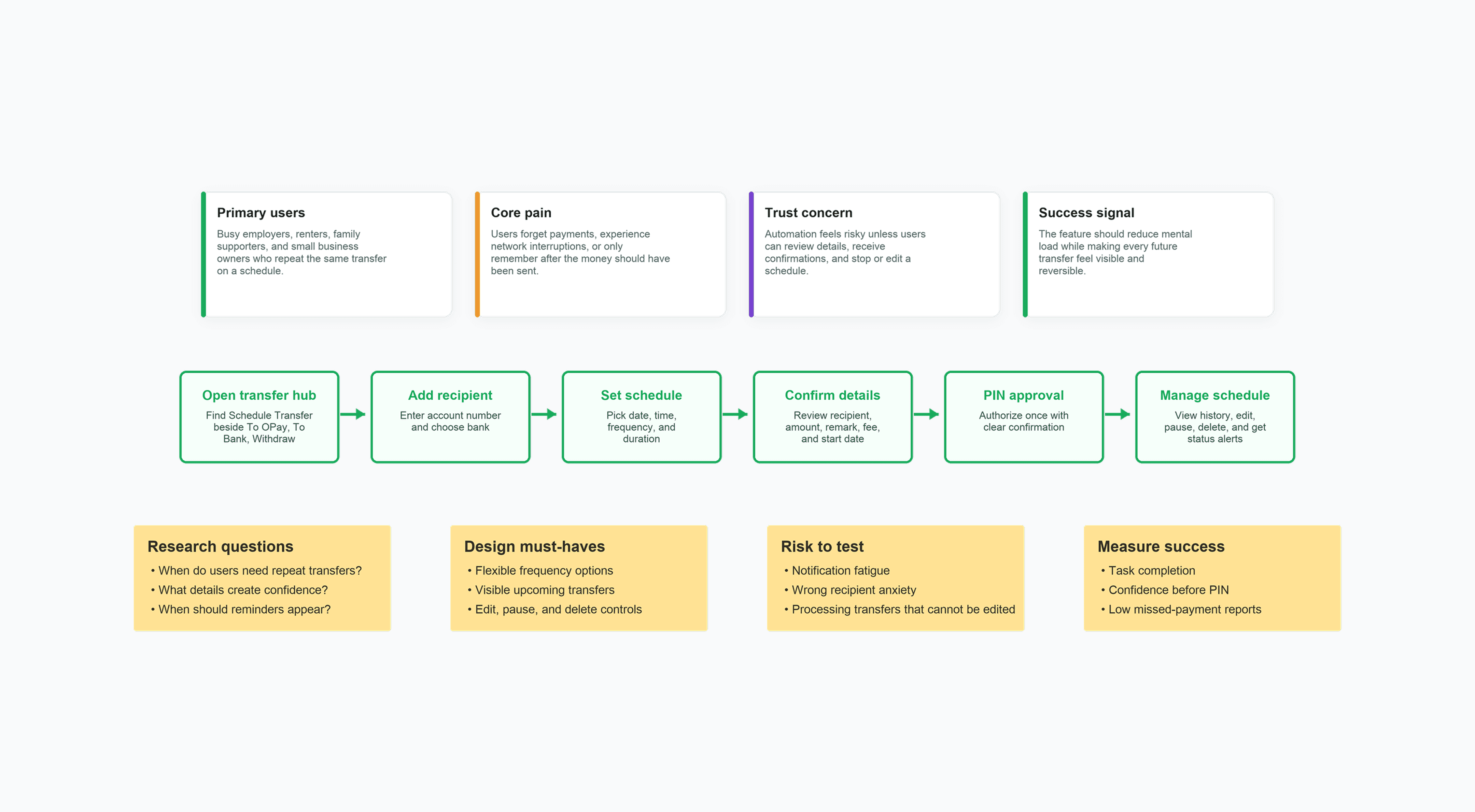
Research focused on users who already depend on OPay for everyday payments but still miss important recurring transfers because they are busy, offline, or relying on memory. The strongest need came from people paying domestic workers, rent, family support, or repeat business obligations: they wanted automation, but only if the feature made the transfer date, time, amount, recipient, notifications, and edit/delete controls extremely clear.
Research focused on users who already depend on OPay for everyday payments but still miss important recurring transfers because they are busy, offline, or relying on memory. The strongest need came from people paying domestic workers, rent, family support, or repeat business obligations: they wanted automation, but only if the feature made the transfer date, time, amount, recipient, notifications, and edit/delete controls extremely clear.
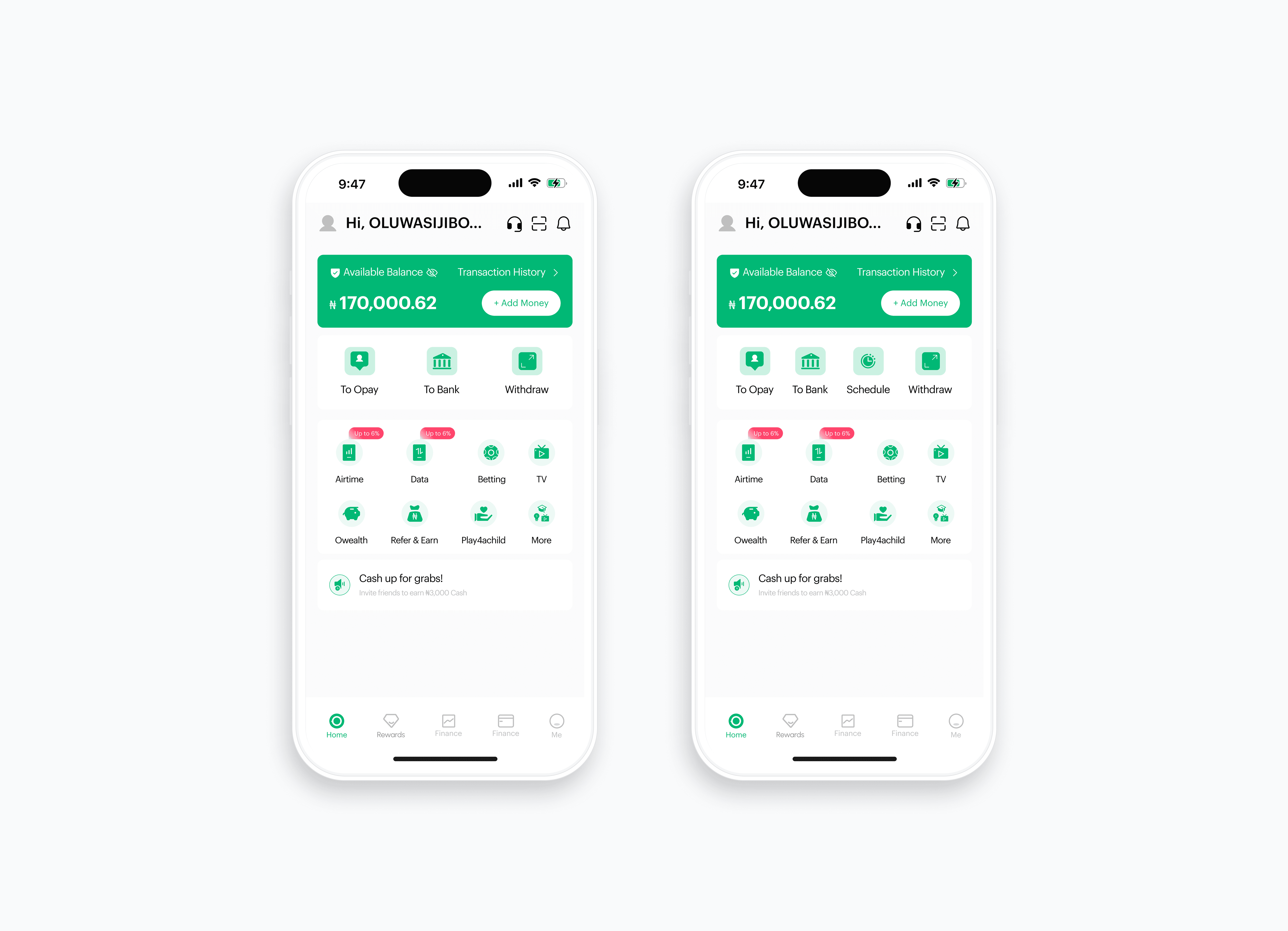
The core features explained here is home screen redesign, schedule transfer, choose a date, choose time, input amount & remark, processing transaction, edit and delete schedule transfer.
The core features explained here is home screen redesign, schedule transfer, choose a date, choose time, input amount & remark, processing transaction, edit and delete schedule transfer.
The homepage shows four cards with detailed description on what each feature can do. This second card section shows 3 features, “To Opay”, “To Bank” and “Withdraw”.
With the introduction of “Schedule Transfer” feature this card section now has 4 features. By a single click you get to automate your transfer.
The homepage shows four cards with detailed description on what each feature can do. This second card section shows 3 features, “To Opay”, “To Bank” and “Withdraw”.
With the introduction of “Schedule Transfer” feature this card section now has 4 features. By a single click you get to automate your transfer.
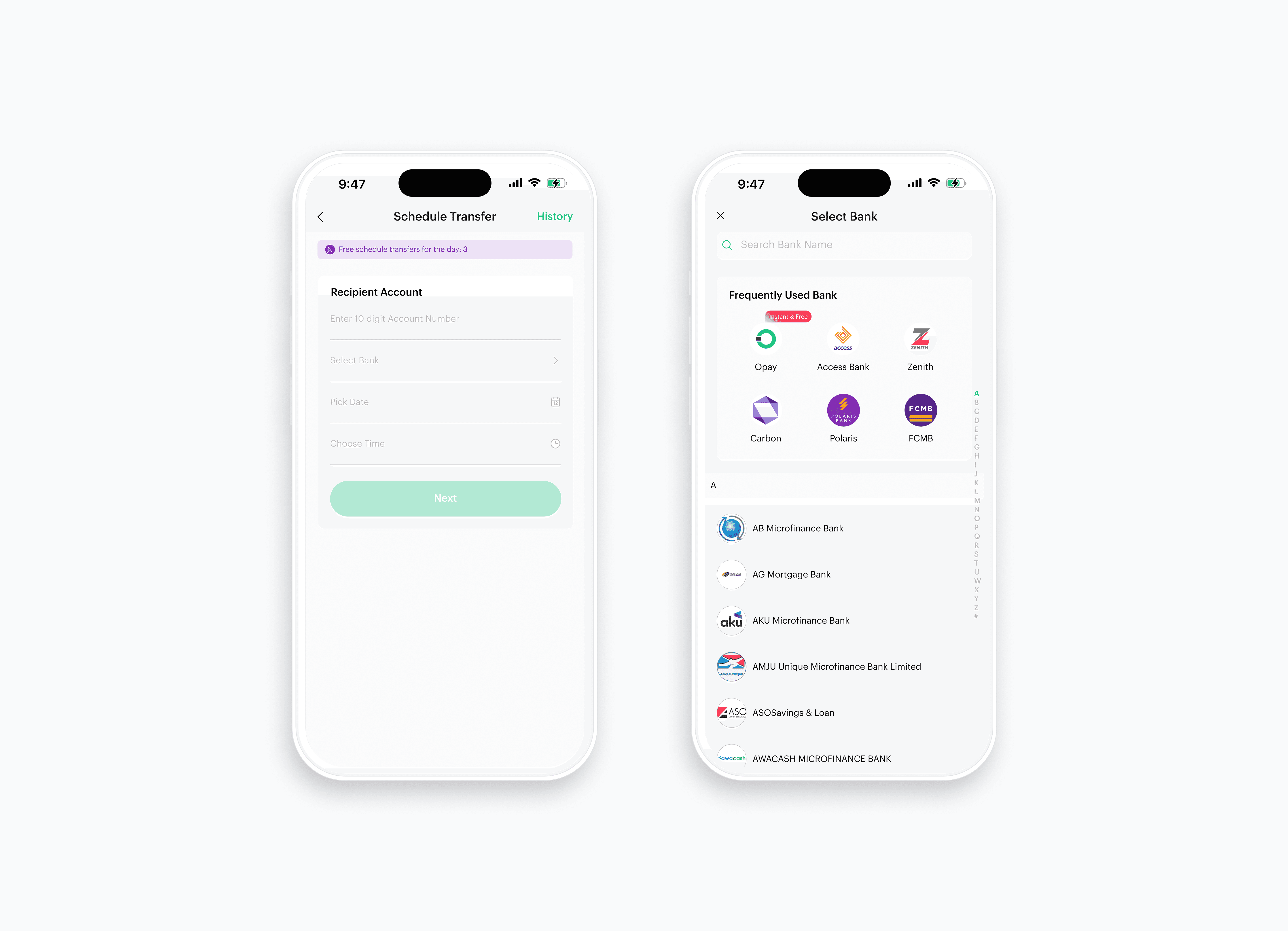
Here you get to automate your transfer by filling the required information. Input the receiver 10 digit account number here.
Search receiver’s bank, you can decide to use the search bar to find the bank or letters on the right side of your screen to search.
Here you get to automate your transfer by filling the required information. Input the receiver 10 digit account number here.
Search receiver’s bank, you can decide to use the search bar to find the bank or letters on the right side of your screen to search.
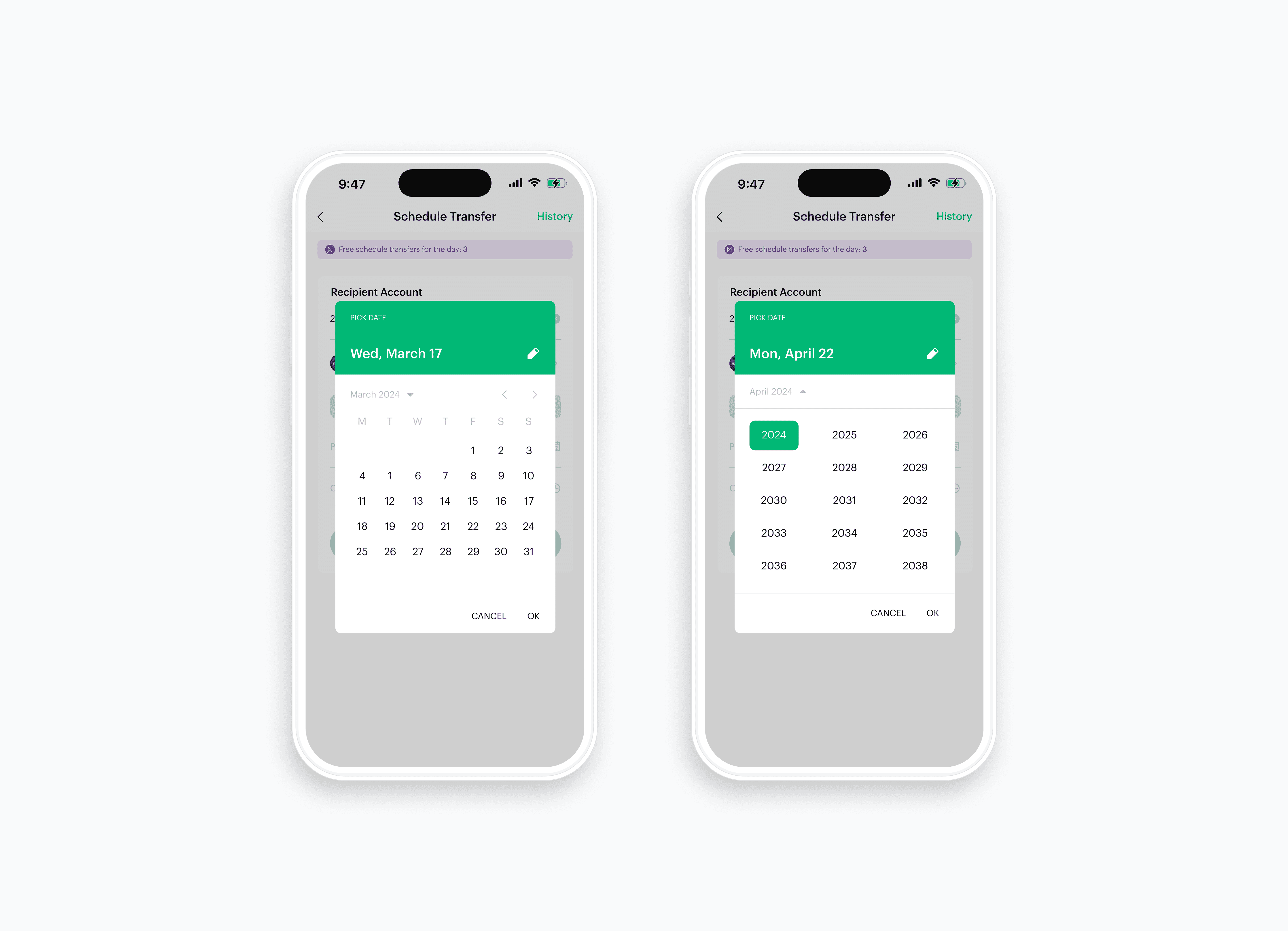
Here you get to automate your transfer by filling the required information. Pick any date of your choice you wish to send the money to the receiver. You can decide to schedule transfer for upcoming years too.
Here you get to automate your transfer by filling the required information. Pick any date of your choice you wish to send the money to the receiver. You can decide to schedule transfer for upcoming years too.
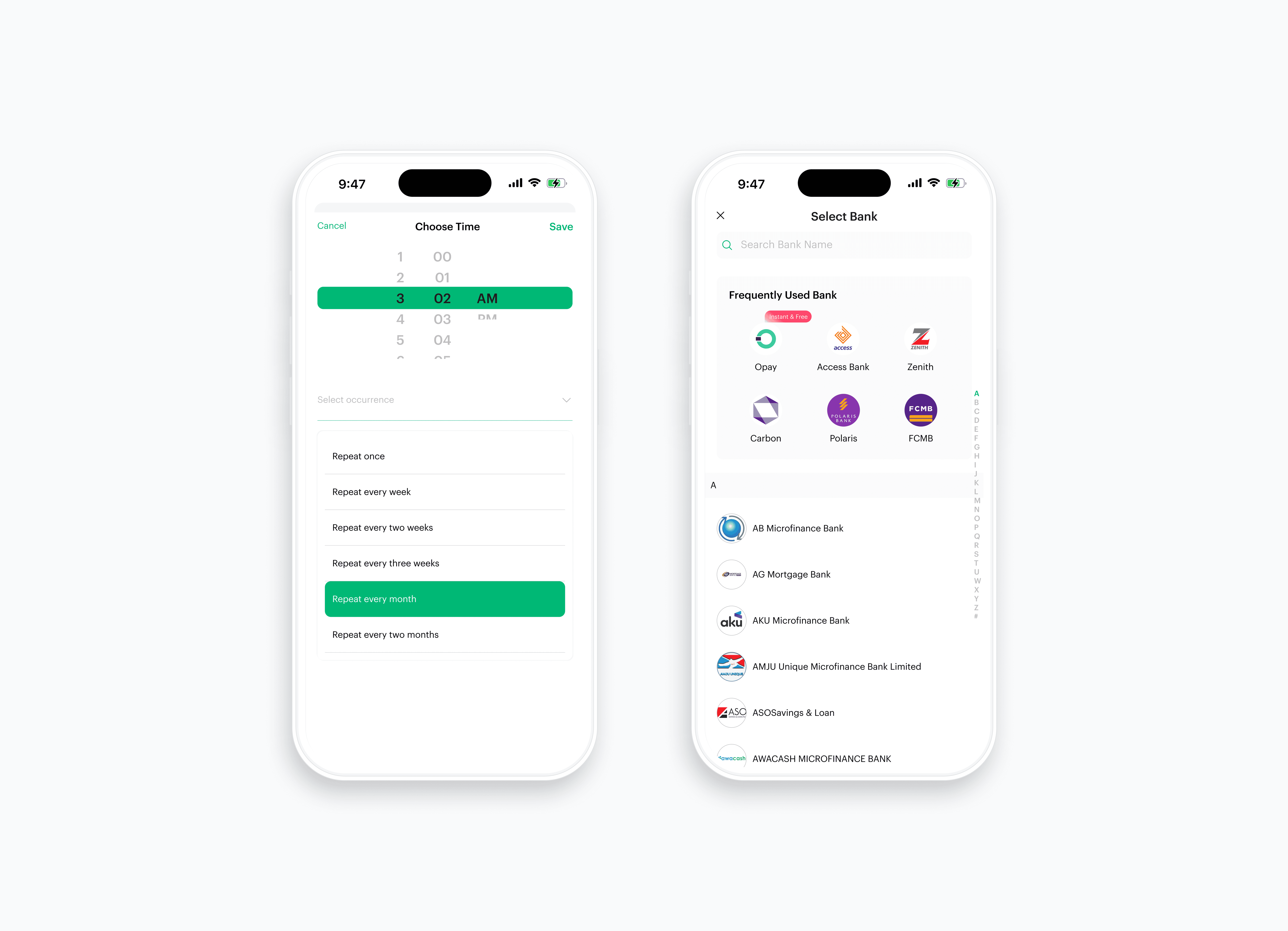
Choose the time you wish to transfer money to the receiver. Here you get to select the duration of how you want to keep sending money to the receiver.
Search receiver’s bank, you can decide to use the search bar to find the bank or letters on the right side of your screen to search.
Choose the time you wish to transfer money to the receiver. Here you get to select the duration of how you want to keep sending money to the receiver.
Search receiver’s bank, you can decide to use the search bar to find the bank or letters on the right side of your screen to search.
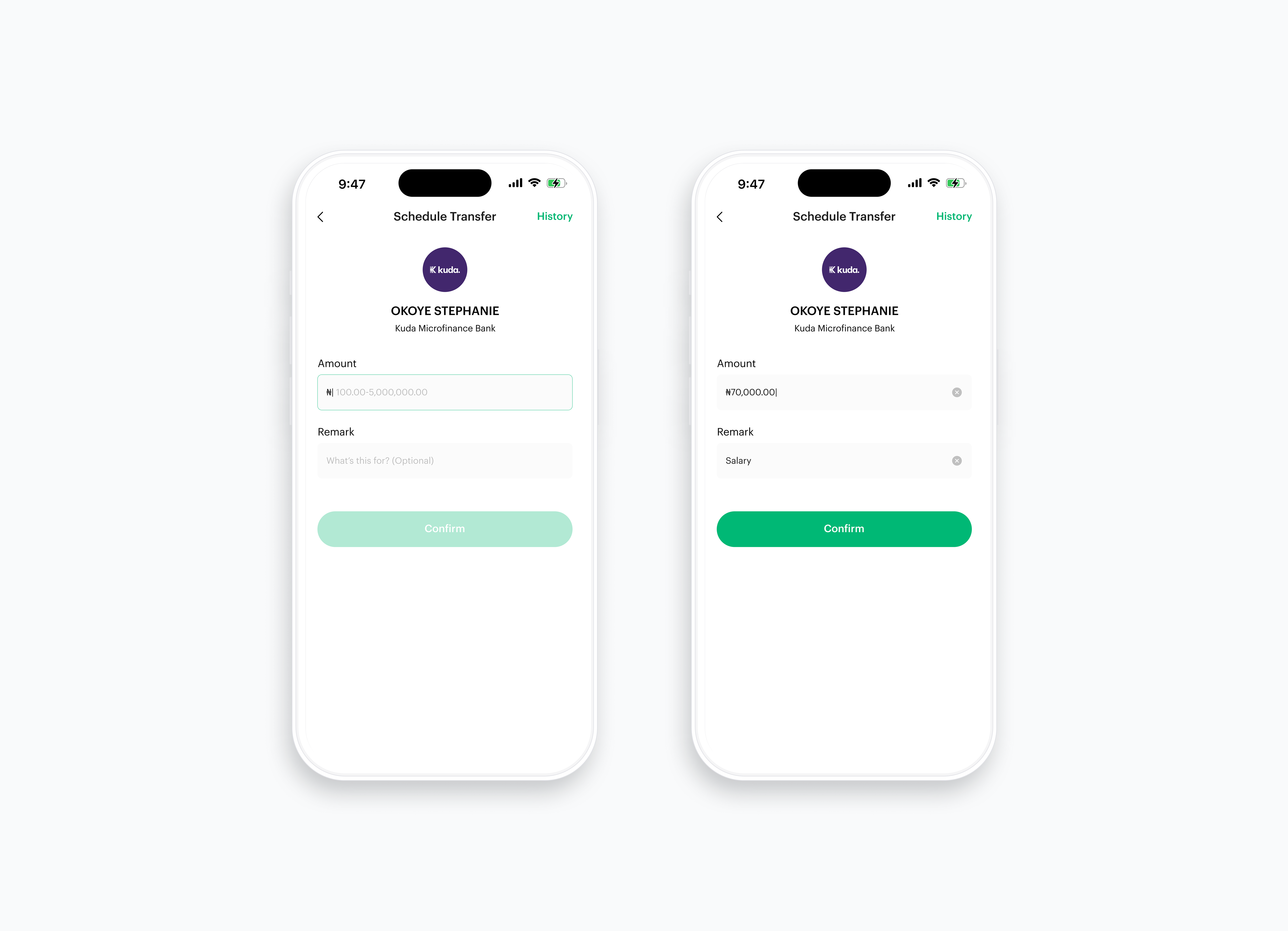
Enter the amount you wish to send to your receiver and type a remark.
Input any amount of your desire here. You choose to write a remark here or not.
Enter the amount you wish to send to your receiver and type a remark.
Input any amount of your desire here. You choose to write a remark here or not.
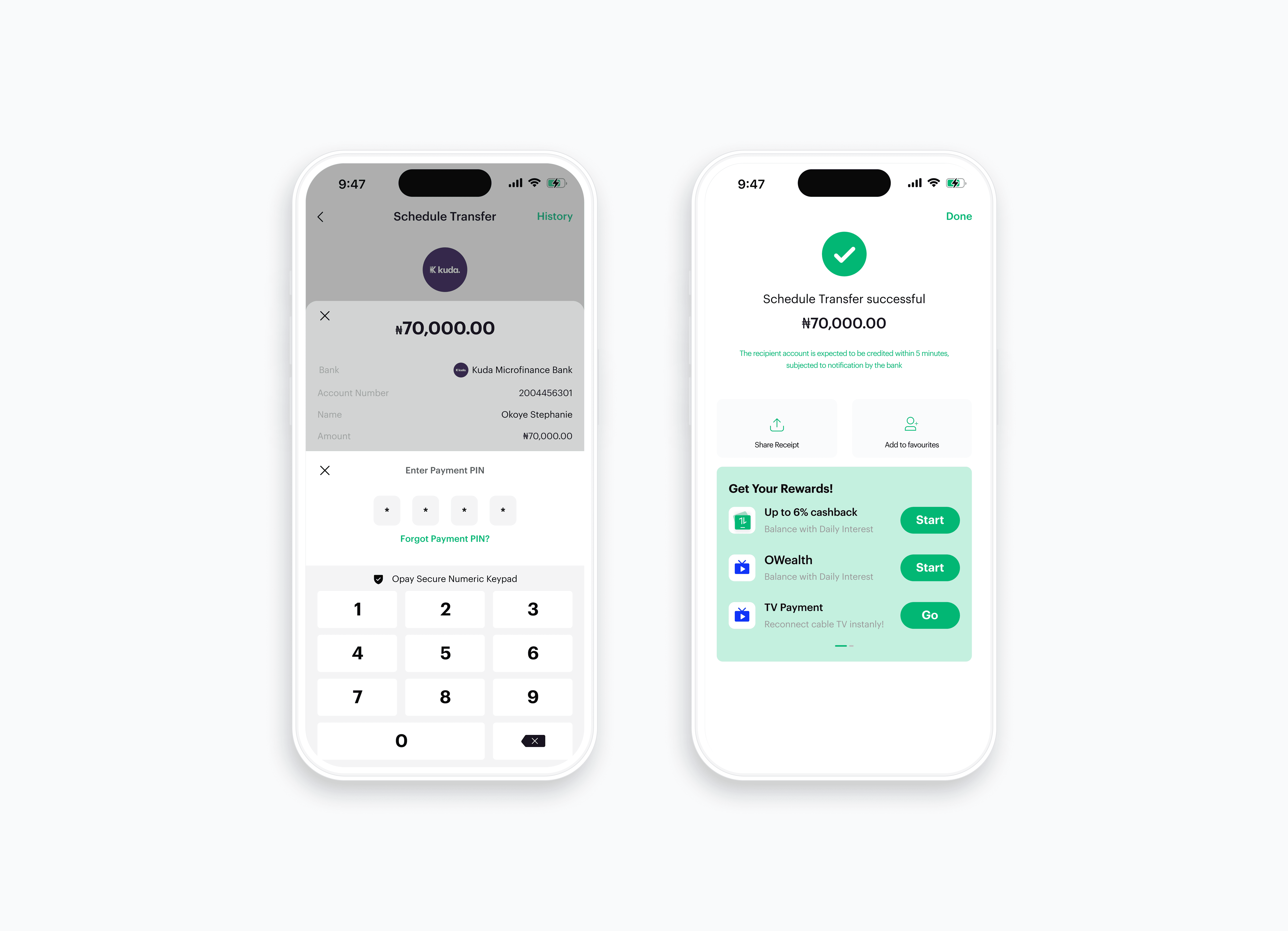
Enter your four digit pin to process your transaction. A success screen pops up after the transfer is made.
Enter your four digit pin to process your transaction. A success screen pops up after the transfer is made.
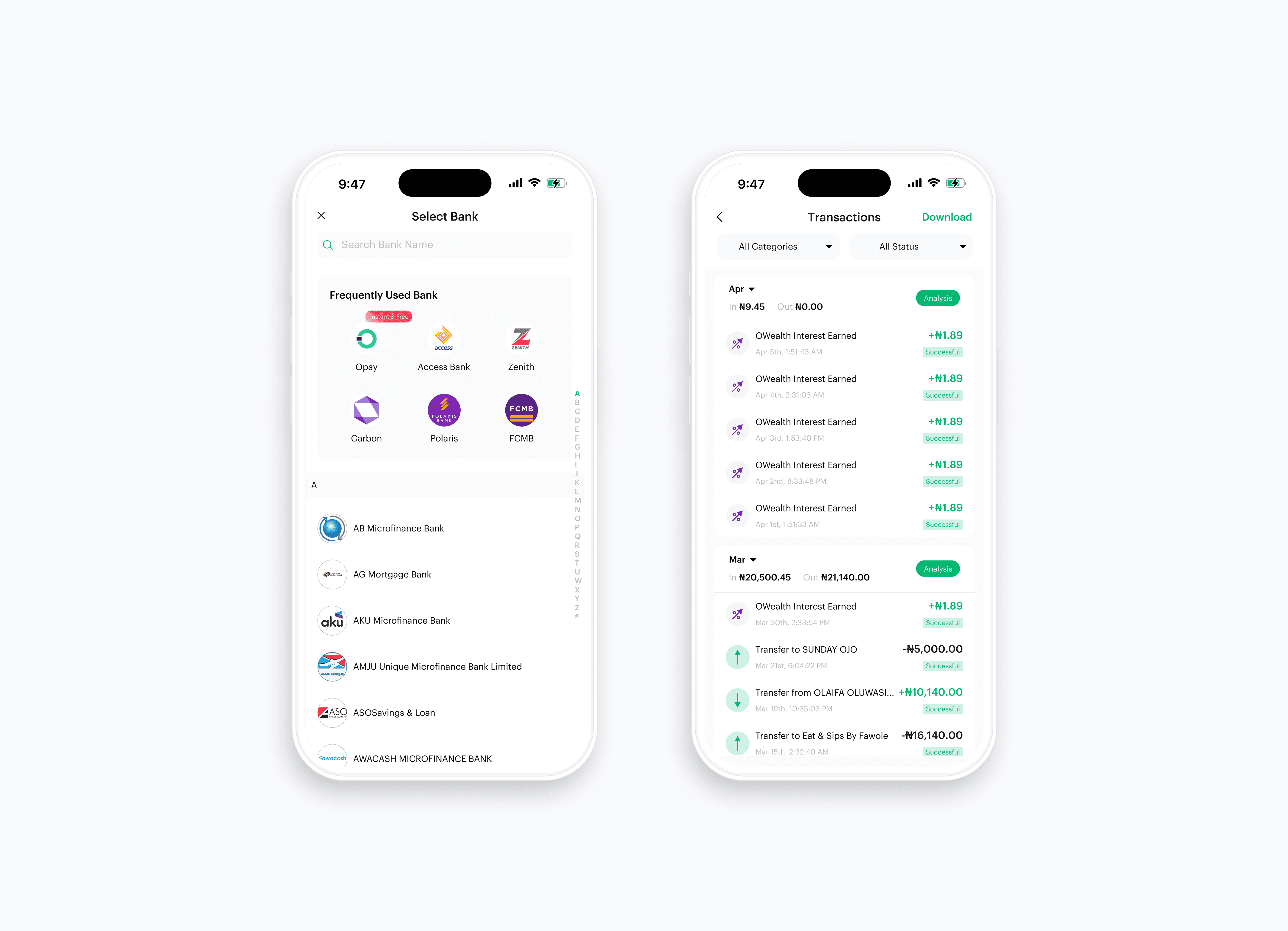
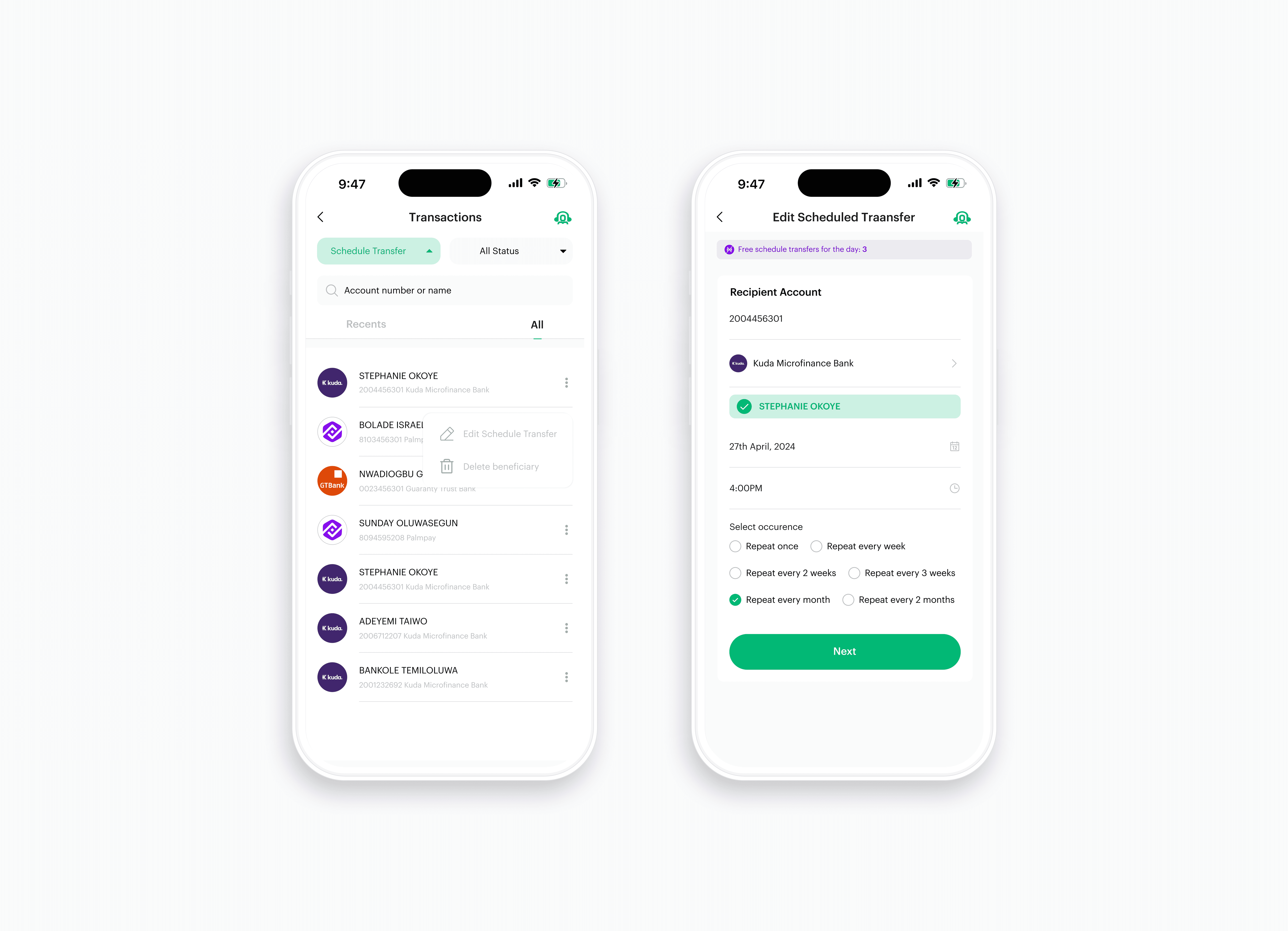
Here you see list of all available categories of transactions in opay, users can select "Schedule transfer" to see all the beneficiaries available.
Here you see list of all available categories of transactions in opay, users can select "Schedule transfer" to see all the beneficiaries available.

The three dot allows you to edit a schedule transfer or delete a schedule transfer depending on the user’s choice.
You can edit date, time and occurrence.
The three dot allows you to edit a schedule transfer or delete a schedule transfer depending on the user’s choice.
You can edit date, time and occurrence.
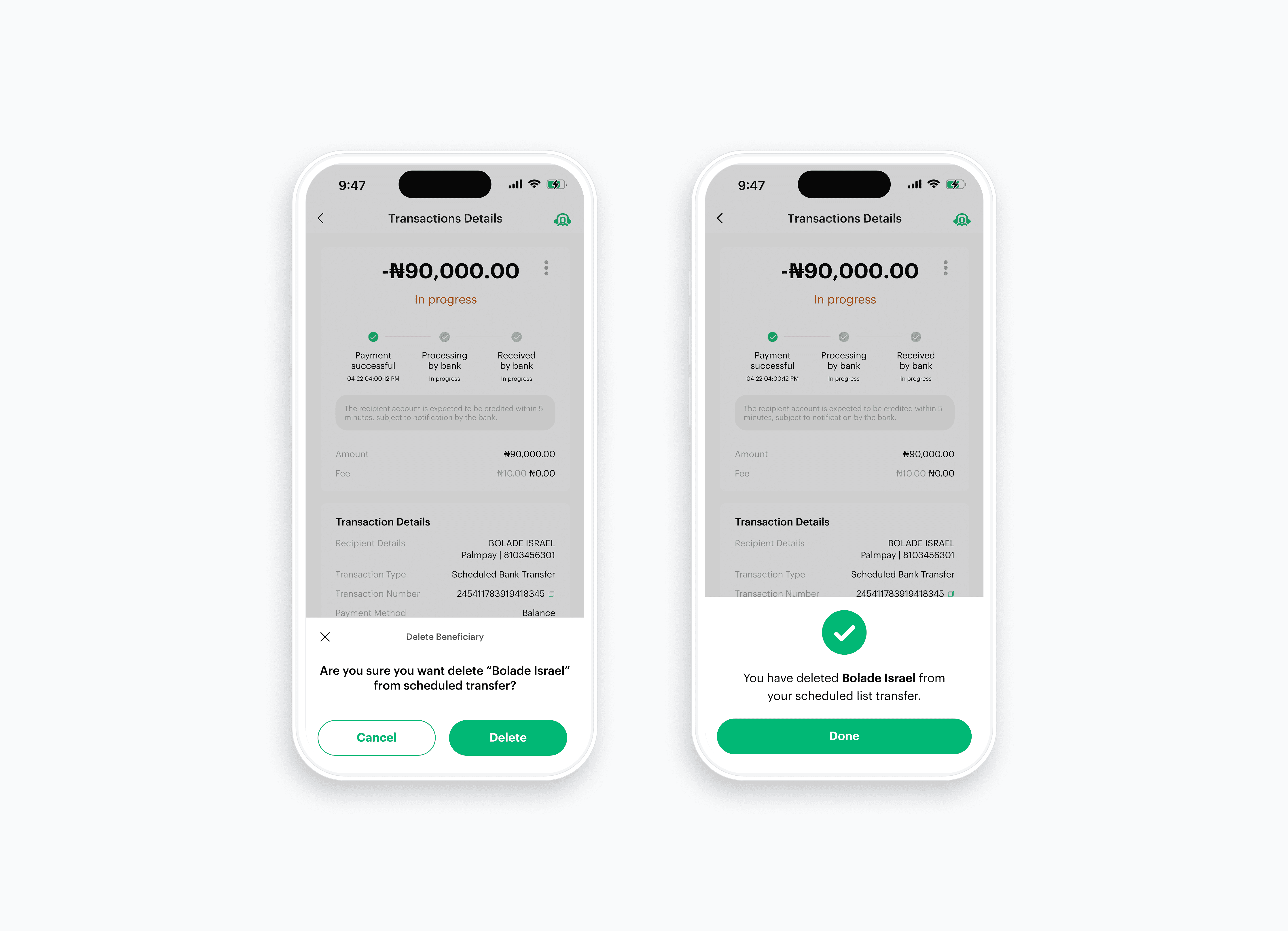
The delete feature allow users to delete a beneficiary completed from their scheduled transfer list.
Success screen pops up to tell the user that a scheduled transfer recipient has been deleted successfully.
The delete feature allow users to delete a beneficiary completed from their scheduled transfer list.
Success screen pops up to tell the user that a scheduled transfer recipient has been deleted successfully.
See how the user journey works.
See how the user journey works.
Prototype
Prototype
Here are the components that made up the design system used for this project.
Here are the components that made up the design system used for this project.
Design system
Adding a scheduled transfer feature to Opay fills a key gap in the current user experience by solving a common and practical challenge. By allowing users to automate their transfers, it prevents missed or late payments—especially for employers who manage domestic worker salaries—while improving overall financial organization and reducing stress.
This feature gives users greater control over their money, eases the mental burden of tracking payment dates, and reinforces Opay’s role as a well-rounded financial platform that adapts to the real needs of its diverse users. Ultimately, scheduled transfers shift payments from a reactive task to a dependable, proactive system that builds convenience and trust into every transaction.
Adding a scheduled transfer feature to Opay fills a key gap in the current user experience by solving a common and practical challenge. By allowing users to automate their transfers, it prevents missed or late payments—especially for employers who manage domestic worker salaries—while improving overall financial organization and reducing stress.
This feature gives users greater control over their money, eases the mental burden of tracking payment dates, and reinforces Opay’s role as a well-rounded financial platform that adapts to the real needs of its diverse users. Ultimately, scheduled transfers shift payments from a reactive task to a dependable, proactive system that builds convenience and trust into every transaction.