

S
I
J
I
I
B
U
K
U
N
FileCC is an all-in-one web app for converting, compressing, downloading, importing, and sharing files across different formats. It helps users handle images, videos, audio, PDFs, documents, eBooks, and archives from one clean workspace, with smart file-type detection, relevant output options, quality controls, and email sharing built into the experience.
FileCC is an all-in-one web app for converting, compressing, downloading, importing, and sharing files across different formats. It helps users handle images, videos, audio, PDFs, documents, eBooks, and archives from one clean workspace, with smart file-type detection, relevant output options, quality controls, and email sharing built into the experience.


Category
Category
Sass
Sass
Role
Role
Design Engineer
Design Engineer
Company
Company
FileCC
FileCC
Duration
Duration
Two weeks
Many file converter tools are cluttered, slow, limited by file size, or force users through unnecessary signup, pricing, and API flows. Users need a simple tool that handles everyday conversion and compression tasks in one place.
Many file converter tools are cluttered, slow, limited by file size, or force users through unnecessary signup, pricing, and API flows. Users need a simple tool that handles everyday conversion and compression tasks in one place.

FileCC provides a clean, responsive workspace where users can upload or import files, automatically detect file type, select relevant output formats, process files, download results, and send them directly by email. The interface is designed to be aesthetic, accessible, and easy to use across desktop and mobile.
FileCC provides a clean, responsive workspace where users can upload or import files, automatically detect file type, select relevant output formats, process files, download results, and send them directly by email. The interface is designed to be aesthetic, accessible, and easy to use across desktop and mobile.

Building FileCC required solving several technical and product challenges:
Making file conversion and compression work across many file types without confusing users.
Handling large video and audio files efficiently, especially on Vercel where server upload limits can affect processing.
Preserving file quality while still reducing file size during compression.
Making cloud imports from Drive, Dropbox, and OneDrive reliable with proper link validation.
Designing a responsive interface that works well on both desktop and mobile.
Ensuring email sharing works through a backend provider instead of relying on local mail apps.
Building FileCC required solving several technical and product challenges:
Making file conversion and compression work across many file types without confusing users.
Handling large video and audio files efficiently, especially on Vercel where server upload limits can affect processing.
Preserving file quality while still reducing file size during compression.
Making cloud imports from Drive, Dropbox, and OneDrive reliable with proper link validation.
Designing a responsive interface that works well on both desktop and mobile.
Ensuring email sharing works through a backend provider instead of relying on local mail apps.
FileCC reduces friction for users who frequently manage files for work, school, content creation, or personal use. By combining conversion, compression, cloud import, and email sharing, it increases productivity and creates a strong foundation for future monetization through premium processing, storage, batch jobs, or API access.
FileCC reduces friction for users who frequently manage files for work, school, content creation, or personal use. By combining conversion, compression, cloud import, and email sharing, it increases productivity and creates a strong foundation for future monetization through premium processing, storage, batch jobs, or API access.
Research for FileCC focused on understanding how users convert, compress, import, and share files in everyday workflows. The process explored common pain points such as slow conversion speed, confusing output options, file-size limits, quality loss after compression, and the need to avoid using multiple separate tools.
Research for FileCC focused on understanding how users convert, compress, import, and share files in everyday workflows. The process explored common pain points such as slow conversion speed, confusing output options, file-size limits, quality loss after compression, and the need to avoid using multiple separate tools.

The core features explained here is home screen redesign, schedule transfer, choose a date, choose time, input amount & remark, processing transaction, edit and delete schedule transfer.
The core features explained here is home screen redesign, schedule transfer, choose a date, choose time, input amount & remark, processing transaction, edit and delete schedule transfer.
FileCC handles image conversion by turning modern image formats like AVIF into more widely supported formats such as PNG. For this, the app uses Sharp, a fast Node.js image processing library. Sharp reads the uploaded AVIF file, decodes it, and exports it as a clean PNG while keeping the image quality controlled through the app’s quality settings.
Libraries/resources used: Sharp, Next.js API routes, file MIME/extension detection.
FileCC handles image conversion by turning modern image formats like AVIF into more widely supported formats such as PNG. For this, the app uses Sharp, a fast Node.js image processing library. Sharp reads the uploaded AVIF file, decodes it, and exports it as a clean PNG while keeping the image quality controlled through the app’s quality settings.
Libraries/resources used: Sharp, Next.js API routes, file MIME/extension detection.
Avif to png prototype
For PDF to image conversion, FileCC reads the PDF pages and renders them into image outputs. This allows users to turn PDF content into formats like JPG, PNG, or WEBP. The app uses PDF.js for reading and rendering PDF pages, while image processing support helps prepare the final downloadable image files.
Libraries/resources used: pdfjs-dist, @napi-rs/canvas, sharp.
For PDF to image conversion, FileCC reads the PDF pages and renders them into image outputs. This allows users to turn PDF content into formats like JPG, PNG, or WEBP. The app uses PDF.js for reading and rendering PDF pages, while image processing support helps prepare the final downloadable image files.
Libraries/resources used: pdfjs-dist, @napi-rs/canvas, sharp.

Pdf to image conversion prototype
Video compression in FileCC is powered by FFmpeg. For local video files, the app uses browser-based FFmpeg so large uploads do not always need to pass through the server. This helps improve compatibility on Vercel and keeps media processing closer to the user’s device. Compression settings are controlled through quality and target size values.
Libraries/resources used: @ffmpeg/ffmpeg, @ffmpeg/util, ffmpeg-static.
Video compression in FileCC is powered by FFmpeg. For local video files, the app uses browser-based FFmpeg so large uploads do not always need to pass through the server. This helps improve compatibility on Vercel and keeps media processing closer to the user’s device. Compression settings are controlled through quality and target size values.
Libraries/resources used: @ffmpeg/ffmpeg, @ffmpeg/util, ffmpeg-static.

Video compression protoype
FileCC allows users to paste a direct file URL and process that file without manually downloading it first. The app fetches the file, checks the response headers, detects the file name/type, and then routes it to the right conversion or compression workflow.
Libraries/resources used: Next.js API routes, native fetch, MIME detection, file extension parsing.
FileCC allows users to paste a direct file URL and process that file without manually downloading it first. The app fetches the file, checks the response headers, detects the file name/type, and then routes it to the right conversion or compression workflow.
Libraries/resources used: Next.js API routes, native fetch, MIME detection, file extension parsing.
Import files via url prototype
When a PDF has multiple pages, FileCC converts each page into a separate image and packages them together. Each image is numbered in order, so the final output is organized and easy to understand. The images are then bundled into a ZIP file for one-click download.
Libraries/resources used: pdfjs-dist, @napi-rs/canvas, sharp, jszip.
When a PDF has multiple pages, FileCC converts each page into a separate image and packages them together. Each image is numbered in order, so the final output is organized and easy to understand. The images are then bundled into a ZIP file for one-click download.
Libraries/resources used: pdfjs-dist, @napi-rs/canvas, sharp, jszip.

Multiple pdf pages to jpg prototype
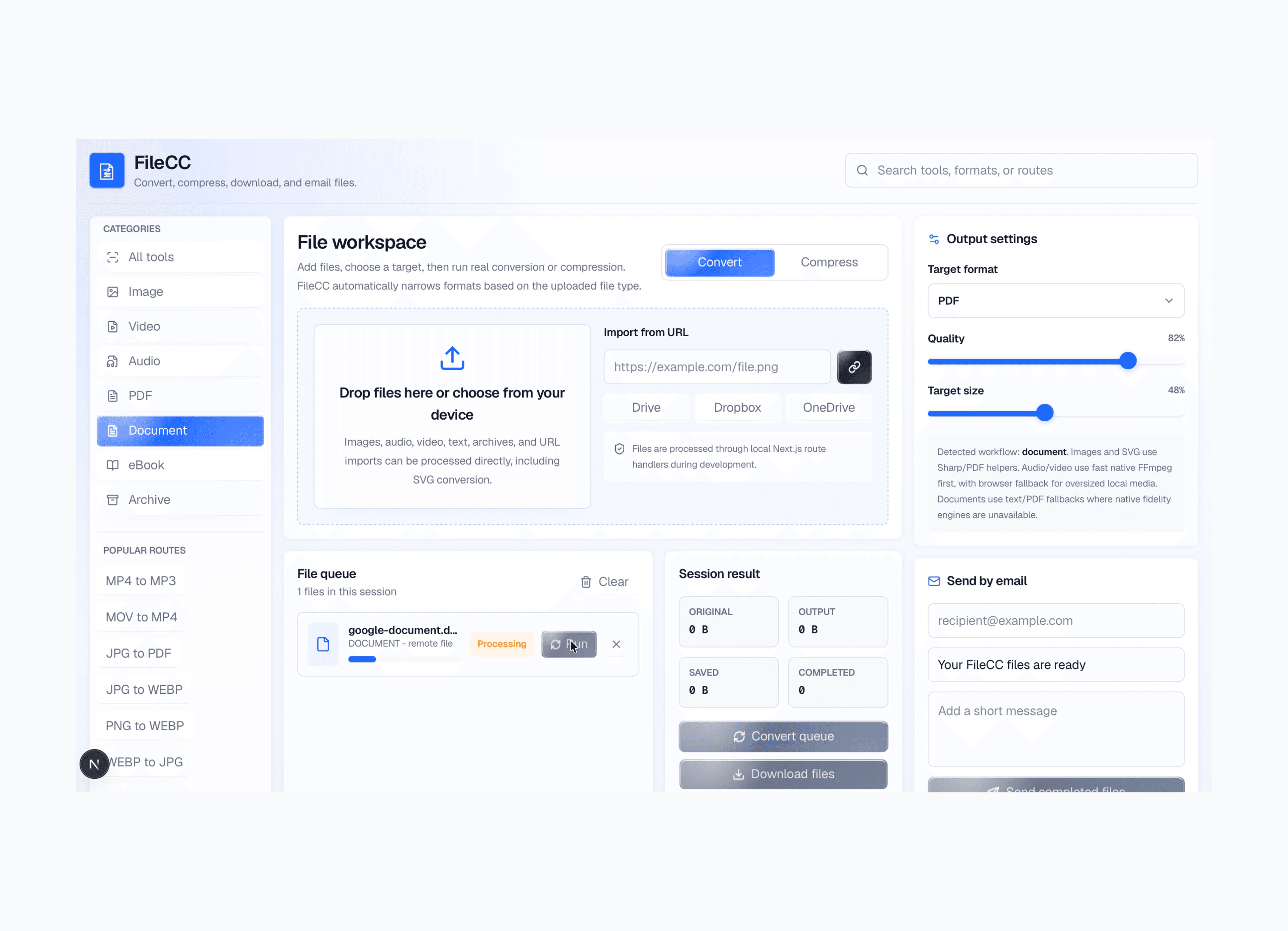
For Google Drive imports, FileCC validates that the link is actually a Google Drive file link, extracts the file ID, and converts it into a downloadable URL. For Google Docs-style links, the app supports export-style handling so documents can be pulled into the conversion workflow more reliably.
Libraries/resources used: Next.js API routes, URL parsing, Google Drive direct download/export URL patterns, native fetch.
For Google Drive imports, FileCC validates that the link is actually a Google Drive file link, extracts the file ID, and converts it into a downloadable URL. For Google Docs-style links, the app supports export-style handling so documents can be pulled into the conversion workflow more reliably.
Libraries/resources used: Next.js API routes, URL parsing, Google Drive direct download/export URL patterns, native fetch.

Import files from google prototype